Geospatial Data Formats: GeoParquet vs Shapefile vs GeoJSON
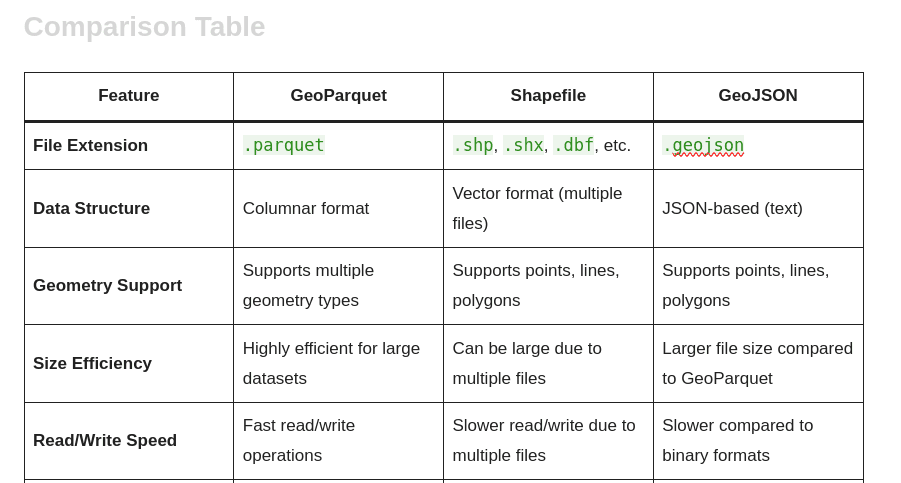
When working with geospatial data, choosing the right format is crucial for performance, interoperability, and usability. This article compares three popular geospatial data formats—GeoParquet, Shapefile, and GeoJSON. Each format has its own strengths and weaknesses, making them suitable for different use cases. Below is a detailed comparison of their features.
Formats at a glance
GeoParquet: A columnar storage format built on Apache Parquet, designed for efficient data processing in cloud-native and big-data environments.
Shapefile: A widely used vector data format developed by Esri. It consists of multiple files (.shp, .shx, .dbf, etc.) to store geometry and attributes, offering broad GIS software compatibility.
GeoJSON: A lightweight, JSON-based format designed for easy sharing and web integration. It is human-readable and widely supported by web mapping libraries.
Quick comparison
| Feature | GeoParquet | Shapefile | GeoJSON |
| File Extension | .parquet | .shp, .shx, .dbf, etc. | .geojson |
| Data Structure | Columnar format | Vector format (multi-file) | JSON-based (text) |
| Geometry Support | Supports multiple geometry types | Supports points, lines, polygons | Supports points, lines, polygons |
| Size Efficiency | Highly efficient for large datasets | Can be large due to multi-file structure | Generally larger due to text-based JSON |
| Read/Write Speed | Fast read/write operations | Slower due to management of multiple files | Slower than binary formats, especially for large datasets |
| Compression | Supports various compression types | Limited compression options | No built-in compression |
| Schema Evolution | Supports schema evolution | No schema evolution support | Limited schema evolution |
| Data Types | Supports complex data types | Limited to basic types | Supports basic to moderately complex types |
| Interoperability | Good with big-data tools (e.g., Spark, Dask) | Highly compatible with GIS software | Excellent with web applications |
| Human Readability | Not human-readable | Not human-readable | Human-readable |
| File Size Limitations | No practical limits | Maximum 2 GB per file | Limited by JSON file size |
| Use Cases | Big data analytics, cloud-native applications | Traditional GIS workflows | Web mapping, APIs |
| Spatial Indexing Support | Yes, via indexing frameworks | Yes, via the .shx file | No inherent spatial indexing |
| Versioning | Supported via storage systems/models | No built-in versioning | No built-in versioning |
Detailed feature analysis
Data structure
GeoParquet: Uses a columnar layout, which is advantageous for analytical queries and processing large datasets efficiently.
Shapefile: Composed of multiple files (.shp, .shx, .dbf, etc.) that separately store geometry and attributes, which can be cumbersome to manage.
GeoJSON: A straightforward JSON format, easy to read and write, but less efficient for large datasets.
Size efficiency
GeoParquet: Optimized for storage efficiency and scalable to large datasets without significant performance degradation.
Shapefile: The multi-file structure can make files large and less efficient to store and access.
GeoJSON: Text-based, so files can be relatively large, especially for complex geometries.
Read/Write speed
GeoParquet: Fast read/write performance, suitable for high-performance applications.
Shapefile: Slower due to the need to manage multiple linked files.
GeoJSON: Slower than binary formats, particularly for large datasets.
Compression
GeoParquet: Supports various compression algorithms to reduce storage footprint.
Shapefile: Limited built-in compression; often relies on external tools.
GeoJSON: Does not have built-in compression, which can increase file size.
Interoperability
GeoParquet: Growing support in big-data ecosystems (e.g., Apache Spark, Dask), ideal for cloud-based workflows.
Shapefile: Broad GIS software compatibility and mature tooling.
GeoJSON: Excellent for web environments and easy integration with JavaScript libraries like Leaflet and Mapbox.
Human readability
GeoParquet: Not human-readable.
Shapefile: Not human-readable.
GeoJSON: Human-readable, facilitating quick inspection and debugging.
Conclusion
Choosing the right geospatial data format depends on your specific needs and use cases.
Choose GeoParquet if you are working with large datasets in a big-data environment and require efficient storage and fast processing.
Choose Shapefile for traditional GIS workflows where compatibility with various GIS software is essential.
Choose GeoJSON for web applications and APIs where human readability and ease of integration are prioritized.